If you use ChatGPT or Claude, you can connect it to BerthTime. Then you can ask about your shipments in your own words.
What you can ask
- "Where is container MSCU4419862?"
- "What arrives this week?"
- "Which shipments are delayed by more than 2 days?"
- "Show me the history of booking 6412345678."
The assistant reads your BerthTime data and answers. It cannot book freight, contact carriers, or read your emails and documents.
How to connect
You do it once, in your ChatGPT or Claude settings. You sign in with your BerthTime account; there is no key or password to copy.
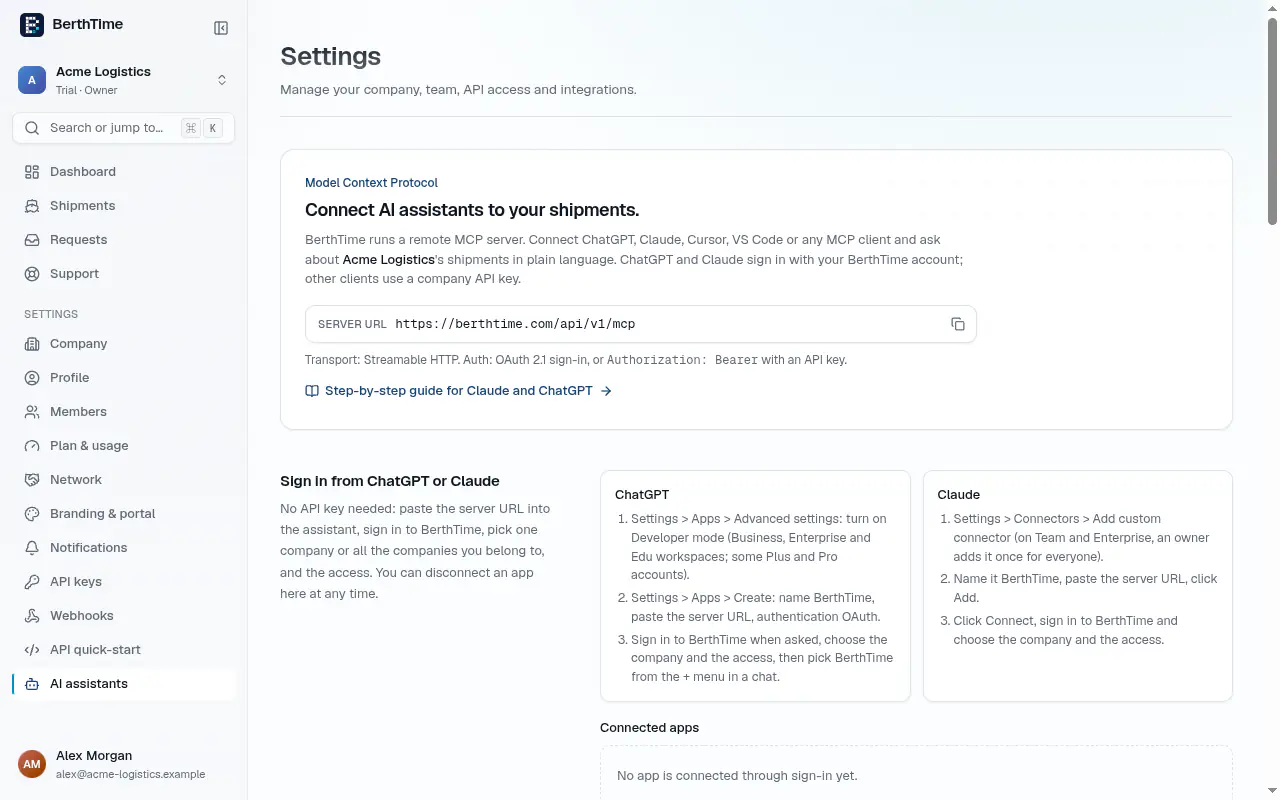
- In BerthTime, open Settings > AI assistants to find the address to paste.
Add BerthTime in your assistant:
- ChatGPT: open Settings > Plugins, click Add, then Custom. Paste the address, choose to sign in, then click Create as a plugin.
- Claude: open Customize and add your own service with the address, then click Connect.
The full step-by-step guide is on the AI assistants page.
- When asked, sign in to BerthTime, choose your company (or all your companies) and the access, then click Allow.
Read only, or read and write?
- Read only (recommended): the assistant can look up shipments, events and arrival dates. It cannot change anything.
- Read and write: it can also start tracking a new number, or archive a shipment. Only owners and admins can give this access.
Good to know:
- Adding a new number through the assistant counts as a shipment, the same as adding it in BerthTime.
- Your shipment data is sent to the assistant you use (OpenAI for ChatGPT, Anthropic for Claude).
- In ChatGPT, this depends on your ChatGPT plan and your workspace settings.
Disconnect
Go to Settings > AI assistants and click Disconnect next to the app. It loses access at once. You can connect it again later.