The free trial
Every new account starts with a free trial:
- 14 days
- up to 100 shipments
- no card needed
We email you 3 days before it ends, and again the day before. To keep going after the trial, choose a plan in Settings > Plan & usage.
If the trial ends without a plan, you move to the Free plan: your 5 most recently added shipments keep updating, once a day. Your other shipments stay visible but stop updating. Nothing is deleted, and choosing a plan starts everything again at once.
On the Free plan you cannot share your shipments with a link or with your connections. Shares you made before keep working, and shipments others share with you stay free.
What counts as a shipment
You pay for shipments, not for users. The rules are simple:
- One B/L or booking is one shipment, however many containers it holds.
- A shipment counts once per month, and only in a month when the carrier returned data for it.
- The same shipment under two numbers counts once. If you add both the booking and the container of the same shipment, BerthTime sees they are the same and counts one.
- No data, no charge. A number the carrier never answers for does not count.
- Archive to stop counting. An archived shipment stops counting from the next month.
Shipments shared with you by a connection are free for you.
See your usage
Go to Settings > Plan & usage.
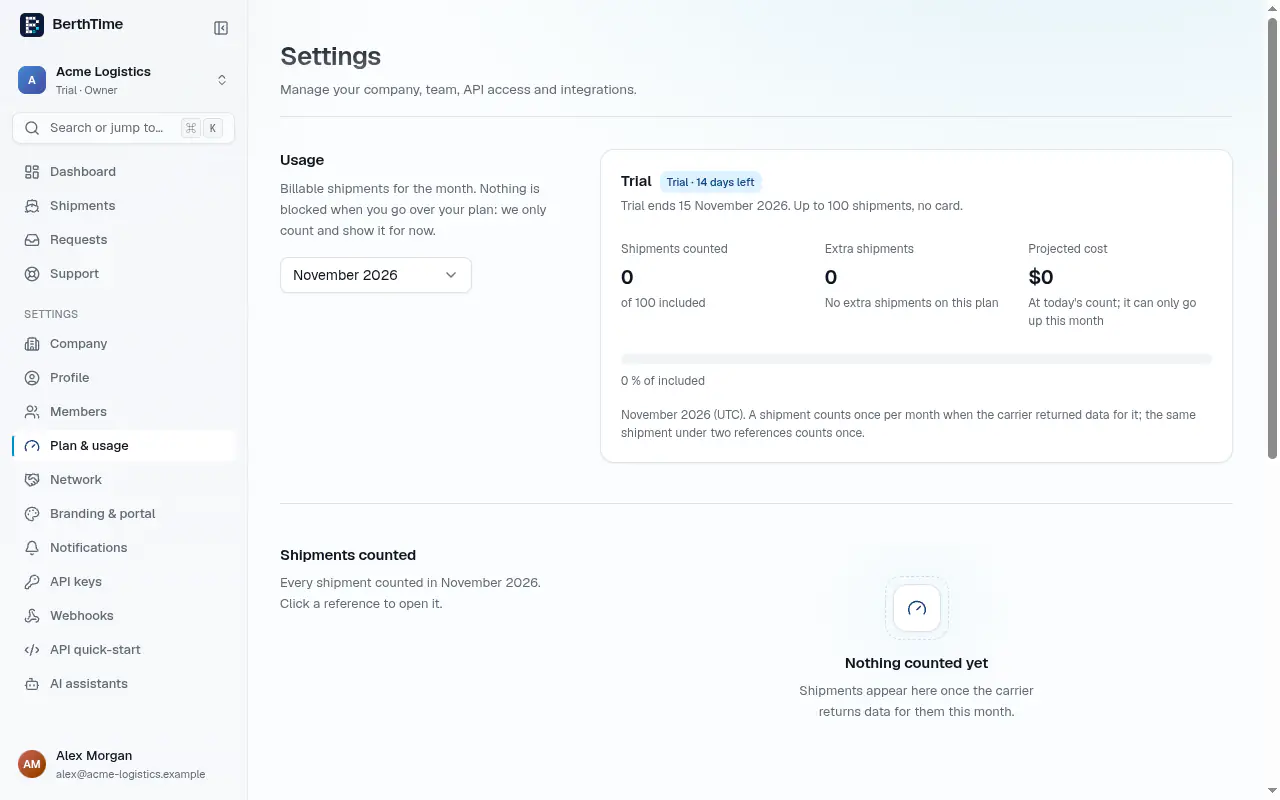
You see:
- Shipments counted this month, and how many your plan includes
- Extra shipments above your plan
- Projected cost for the month, based on today's count
- the list of every shipment counted, with the date it was first counted
Use the Month list to look at a past month. We also email you when you reach 80% and 100% of your plan.
Above your plan
Nothing is blocked when you go over your plan: tracking continues. On paid plans, the extra shipments are billed at your plan's extra-shipment price and invoiced monthly. The Free plan has no extra shipments: move to a larger plan instead.
Change your plan
The prices of every plan are on the pricing page.
- Go to Settings > Plan & usage.
- In the Plans table, click Upgrade or Switch next to the plan you want.
- Choose monthly or annual billing. Annual billing gives free months.
- Complete the secure payment page.
Only owners and admins can change the plan.
Invoices and cancelling
Click Manage billing to see your invoices, update your card, or cancel. If you cancel, your plan runs until the end of the period, then you move to the Free plan.